
Match people from Odoo to your members
Turn the names of salespeople from Odoo into real workspace members on your records, in one step.
The screenshots show the English interface. The buttons are in the same places, and most are labelled in your language.
Odoo records often name a salesperson or an owner. After an import, Vellumica can match each name to a workspace member, by email first and then by exact name, and fill a person field on all of that person records at once.
- 1
Go to Settings and open the Integrations tab, then find the card Unassigned people from Odoo.
- 2
Choose the app in Look in, the field that holds the person in Field holding the person, and the person field in User field to fill.
- 3
Choose Scan assignments in background. The scan runs in the background, so you can leave the page and come back.
- 4
Check each person in the list, fix the ones with no match or several matches, tick the people to assign and choose the assign button.
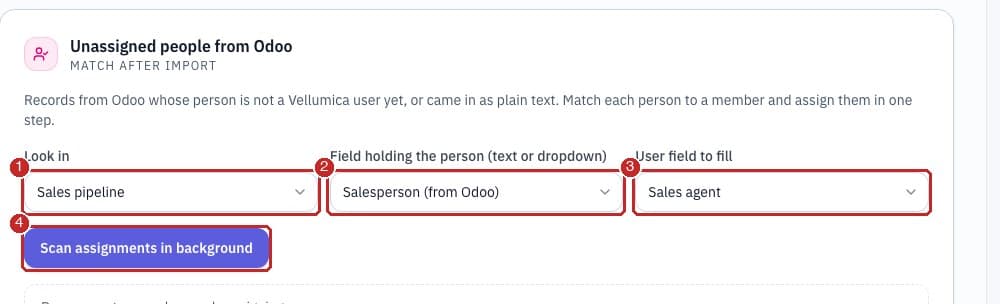
- 1Look in: the app to look in, or every Odoo import.
- 2Field holding the person: the field that holds the name or email from Odoo.
- 3User field to fill: the person field to fill.
- 4Scan assignments in background: runs the scan and lists each person with the records they appear on.
Related guides
Need more help?
Our team is happy to help.