
For app builders
Create an app
Create a Workflow or Custom Data app from the dashboard, and tell the two types apart.
The screenshots show the English interface. The buttons are in the same places, and most are labelled in your language.
An app is where a team keeps its records. You create one from the dashboard and choose its type.
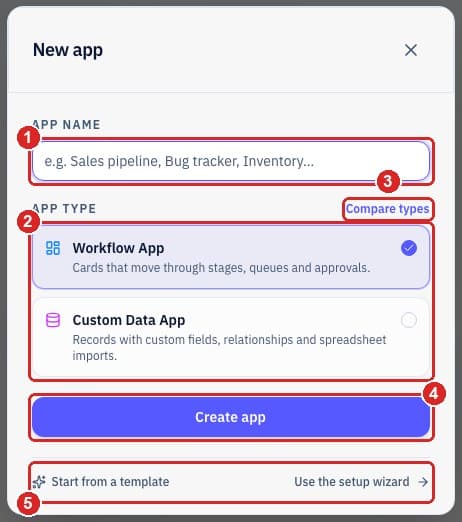
- 1Name your app, for example Sales pipeline or Call dispositions.
- 2Choose the type. A Workflow app moves cards through stages, such as queues, approvals and follow-ups. A Custom Data app stores records with fields, relationships and spreadsheet imports.
- 3Not sure which? Choose Compare types.
- 4Choose Create app.
- 5Or start from a ready-made template, or use the setup wizard for guided setup.
How to tell which type an app is
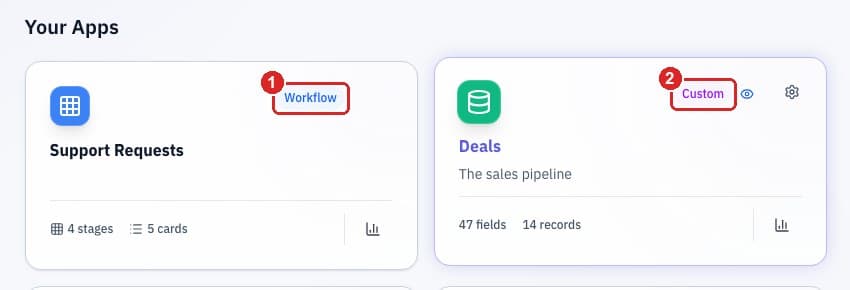
- 1A Workflow app is tagged Workflow.
- 2A Custom Data app is tagged Custom.
Why it mattersStages are set up differently in each type. In a Workflow app they live in Settings → Stages. In a Custom Data app they are the options of a dropdown field. The next guides cover both.
Who can do thisOwners, admins and members can create apps by default. Viewers cannot.
Related guides
Need more help?
Our team is happy to help.